Short answer
Read the wallet prompt as an authorisation request, not a branding screen
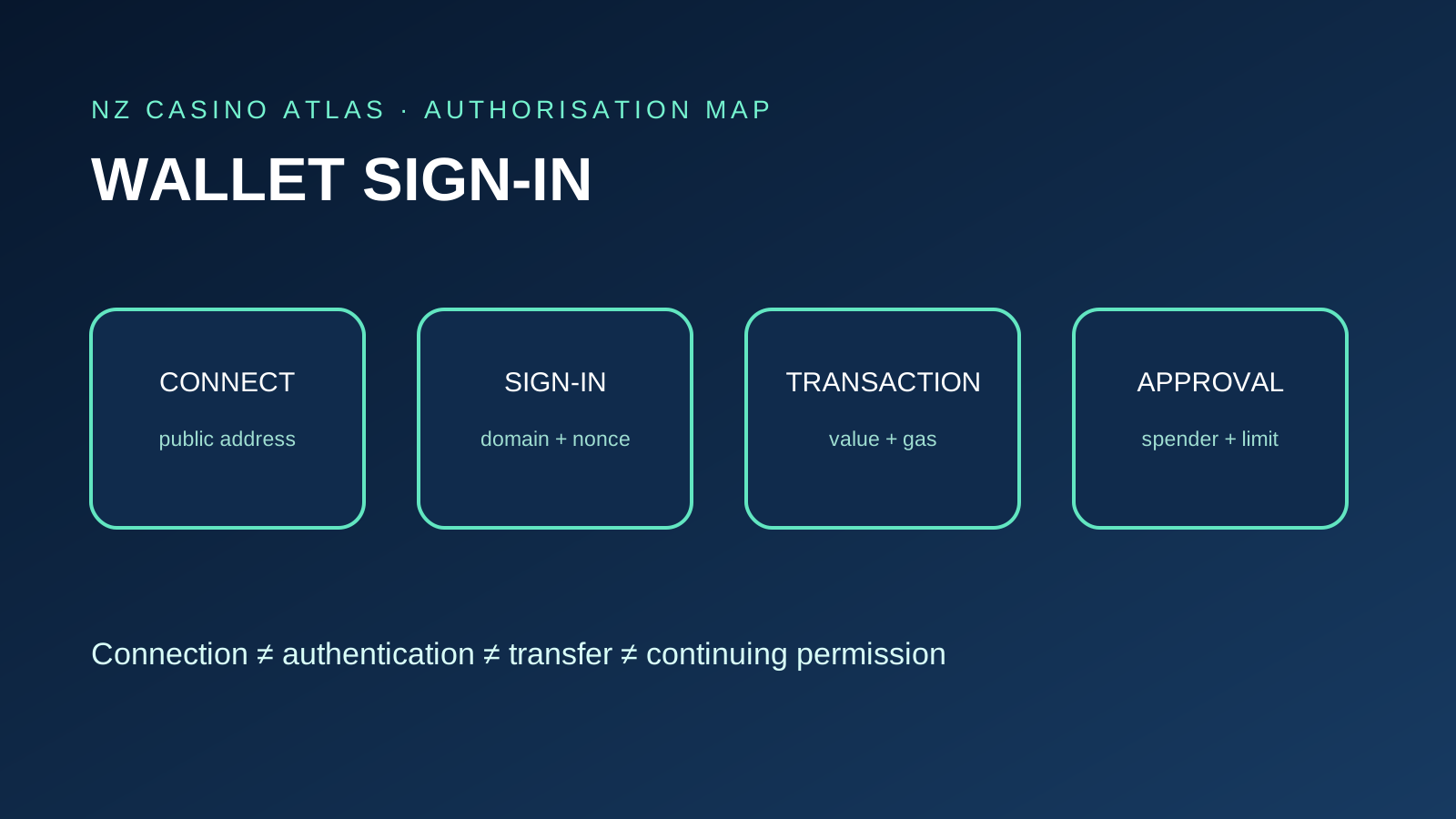
A casino can ask a wallet for several different things that look similar in a pop-up. “Connect” usually reveals a public address and selected chain. “Sign in” asks for a cryptographic signature over a message. “Send” creates a value-moving transaction. “Approve” can give a smart contract continuing authority over a token.
The safe question is not merely “Did my wallet open?” It is “What exact bytes, domain, address, chain, amount, recipient and permission am I authorising?” A familiar wallet interface can still display a request created by a malicious or compromised site.
A normal off-chain login challenge should not need a gas fee or token allowance. If the prompt shows a contract call, asset amount, spender, unlimited approval or opaque data, stop and treat it as a separate high-risk action.
This guide covers authentication and permission evidence. It does not provide a casino deposit workflow, network-selection instructions or a method to bypass country restrictions.
Mental model
Separate connection, authentication, transaction and approval
Connection establishes a communication session between a site and wallet. It may expose public account addresses, selected network and wallet capabilities, but should not reveal the private key.
Authentication proves control of an address by signing a unique challenge. Ethereum.org describes wallet-based authentication as a flow in which the application receives the address, issues a nonce, verifies the returned signature and creates a session.
A transaction is a signed instruction intended for blockchain execution. It can transfer native currency or call a smart contract. Fees, destination and data matter because confirmed blockchain transactions are generally not reversible.
An approval or permit grants a contract permission over assets. It may persist beyond the browser session. Treat it as financial authority, not a harmless login confirmation.
Read-only exposure
A basic connection shares public account context
Ethereum.org explains that wallets let users sign in to applications, read balances, send transactions and verify identity. These are separate capabilities behind one wallet interface.
At connection, check the requesting domain displayed by the wallet and the account selected. A public address can reveal balances and transaction history through public ledgers, so choosing an account is also a privacy decision.
Connection alone does not prove the site controls the brand it displays. A phishing page can request the same public information. Start from an independently verified operator domain rather than an advert, direct message or copied QR code.
If read-only browsing does not require a wallet, consider delaying connection until there is a clear, documented reason. Less exposure and fewer active sessions reduce the chance of confusing later prompts.
Authentication challenge
A sign-in message should explain exactly what is being proven
A structured sign-in message should identify the requesting domain, public address, statement or purpose, URI, version, chain ID, nonce and issue time. Expiry and not-before fields may further limit reuse.
The signature proves that the wallet controlling the address approved that message. It does not reveal the private key, and a casino never needs the seed phrase to verify it.
Read the entire message. A vague hexadecimal blob, unexpected contract address or permission language is not equivalent to a plain authentication challenge. If the wallet cannot show a human-readable meaning, do not sign merely because the button says “login”.
After signing, the site may create a conventional web session. Check account settings for active sessions and logout controls; a wallet signature need not be repeated for every page view.
Origin binding
The message domain must match the site you intended to use
Compare the wallet prompt with the full browser origin, including spelling and subdomain. A legitimate-looking brand in the statement cannot compensate for a mismatched domain.
Sign-In with Ethereum uses domain and URI fields to bind authentication context. That binding helps prevent a signature requested on one origin from being silently represented as consent to another.
Check redirects before connecting. A documented authentication provider can be legitimate, but the relationship should be explained by the operator and the final signed domain must make sense.
Do not trust a QR code solely because it appears inside a casino page. Verify the browser domain first and read the domain shown by the wallet after scanning.
Replay protection
A unique nonce and bounded time make a login challenge safer
A nonce is a one-time challenge generated for the session. The server should verify it and prevent reuse so that an old captured signature cannot simply open another session.
Issue time, expiry time and not-before constraints define when the message is valid. An undated, reusable statement gives weaker evidence about the user's current intent.
Record whether the prompt appears to contain a fresh nonce when troubleshooting, but never publish a live session token. A signature and message pair may still be useful to an attacker if the implementation accepts replay.
Users cannot audit the casino's backend from a prompt alone. The practical check is whether the message includes sensible fields and whether the site invalidates the challenge after use or expiry.
Critical distinction
A message signature is not automatically a transfer—but signatures can still be dangerous
An ordinary off-chain sign-in message does not broadcast a transaction or consume gas. Ethereum.org's wallet guide states that confirming a connection signature should not require spending ETH.
A transaction prompt typically shows a network fee, recipient or contract, value and action. A typed-data signature can also carry financial consequences, including permit-style authority, even when no gas is charged immediately.
Therefore “no gas” is not a complete safety test. Read the message type, verifying contract, spender, amount, deadline and human-readable intent. Reject blind signing or unexplained structured data.
The Ethereum Foundation's clear-signing work emphasises understandable transaction confirmations because users can approve harmful actions when raw data is opaque. When the wallet cannot explain an action, stopping is safer than guessing.
Continuing authority
Token approvals can outlive the casino session
MetaMask explains that a token approval lets a dapp or contract access a stated amount without requesting the same approval transaction again. Unlimited approvals increase the amount at risk.
Check the token, spender contract, allowance amount and network. “Approve all” or NFT operator permissions can affect more assets than the immediate action appears to require.
An approval is an on-chain permission, not authentication. A casino that presents an unlimited token allowance as necessary merely to log in has crossed an important boundary.
Prefer narrowly bounded permissions when a legitimate transaction genuinely requires them, and review existing allowances later. This article does not instruct readers to fund or deposit at a casino.
Session scope
Wallet sessions can expose accounts, chains and requested methods
A connection protocol may negotiate which accounts, networks and wallet methods a site may request. Review the scope rather than accepting every account and chain by default.
Select only the account intended for the session. A separate low-exposure wallet can reduce linkage and asset risk, but it does not make an unverified operator safe or permitted.
Wallet prompts should still appear for actions requiring user approval. A site should not obtain a private key through a connection protocol, and support never needs remote control to “repair” a session.
After use, inspect connected sites in the wallet and remove sessions no longer needed. This limits future prompts and public-address exposure.
Two different clean-up actions
Disconnecting a site is not the same as revoking asset authority
Disconnecting ends or removes the communication session and may make the site request connection again. Logging out ends the casino's web session. Neither action necessarily changes blockchain state.
Token approvals and permits are separate. Existing on-chain allowances can remain after the site is disconnected, the browser tab is closed or the casino account is logged out.
Review approvals through a trusted wallet interface or appropriate explorer reached independently. Confirm the chain, token and spender before submitting a revocation transaction.
Revocation itself may be an on-chain transaction with a fee. Do not follow an unsolicited “revoke now” link; scammers use urgent clean-up messages to request another harmful signature.
QR and deep-link handoff
Verify both browser origin and wallet request after handoff
QR-based connection moves a request from the browser to a mobile wallet. The code is transport, not proof of the casino's identity.
Before scanning, check the desktop domain. After scanning, compare the app or domain name, requested accounts, chains and methods shown by the wallet.
Deep links can open the expected wallet app while carrying a malicious session request. The fact that a legitimate wallet opened does not make the originating site legitimate.
Reject unexpected pairing requests and remove stale sessions. Never scan a support-agent QR code or share a pairing URI to let someone else control the connection flow.
Separate evidence chain
A valid signature proves address control, not operator legitimacy
Cryptographic verification can show that a particular address signed particular content. It does not verify the casino's contracting company, licence scope, withdrawal terms or New Zealand eligibility.
Start from current terms and identify the legal entity, official domain, restricted countries, account requirements and verified support route. Then compare the authentication domain with that record.
A site can correctly verify a wallet while making false business claims. Conversely, a genuine operator can use a poorly explained signature flow. Both dimensions need independent review.
Use the NZ crypto-casino evaluation hub for the wider operator checklist and the app provenance guide when software installation is involved.
Public address linkage
Wallet login can connect public history to a casino account
A public address and its transactions may be observable on-chain. Connecting and authenticating can associate that address with account records, device signals and identity data held by an operator.
Disconnecting does not erase past on-chain activity or records already collected under the operator's privacy policy. Address rotation can also create links when funds move between related wallets.
Read privacy terms before connection and avoid sharing screenshots containing addresses, balances, QR codes or session data. Treat a public address as pseudonymous rather than automatically anonymous.
The on-chain privacy guide covers transaction-linkage evidence in depth without promising anonymity or KYC avoidance.
Worked prompt audit
How to classify a wallet request before accepting it
First compare the browser origin with the domain displayed by the wallet. Next identify whether the prompt is a connection, plain message, typed-data signature, transaction or approval.
For a login message, read the statement, address, domain, URI, chain, nonce, issue time and expiry. There should be no unexpected recipient, token amount, spender or gas fee.
For any transaction or typed data, inspect the contract, function, assets, amount, deadline and continuing permission. If the wallet shows opaque data or the site changes the explanation after the prompt opens, reject it.
After successful authentication, verify that the casino account displays the intended public address and provides logout/session controls. Do not test with valuable assets merely to see whether the flow works.
Account architecture
Smart-contract wallets and repeated addresses need extra context
An externally owned Ethereum account produces signatures directly from its private key. A smart-contract wallet may validate signatures through contract logic, multiple owners, guardians or another policy. A casino authentication backend therefore needs to support the actual account type rather than assuming every address can be checked with one recovery method.
A failed signature check does not justify exporting a seed phrase or switching off wallet protections. It may indicate unsupported smart-account verification, the wrong chain, an expired nonce or a mismatched address. Ask verified support whether the documented login method supports that wallet type, without disclosing secrets.
The same hexadecimal address can appear on several EVM-compatible networks, but balances, contracts and permissions are network-specific. Confirm the chain ID in a structured login message and separately in every transaction or approval prompt. A familiar address on the wrong chain is not evidence that the intended account context is correct.
Contract-wallet signatures can also involve several signers or an on-chain validation step. Record what the wallet clearly displays and avoid simplifying a multi-party authorisation into a normal personal-message signature. The operator should explain the supported path before any financial authority is requested.
Ongoing access
Authentication sessions need visible expiry and account controls
A successful signature commonly leads to a cookie or token-based web session. That later session is separate from the wallet key and can remain active until logout, expiry or server-side revocation.
Look for a list of active devices or sessions, recent login records and a way to end all sessions after suspected phishing. Signing a fresh message should not silently authorise unrelated old devices.
Changing the connected address should force the site to re-evaluate account ownership and permissions. If the interface continues showing a previous account after disconnection or address change, stop before approving anything and clear the session through documented controls.
These checks do not prove backend security, but they reveal whether the operator exposes basic account-state evidence and gives the user a practical way to terminate access.
When something is wrong
Reject the request, preserve evidence and separate the response steps
If a prompt is unexpected, close it without signing. Save the browser domain, message or transaction details, requested contract and time, while redacting account identifiers before sharing.
Disconnect the site and end the web session. Then separately review token approvals and active wallet sessions from independently opened trusted tools.
If a seed phrase or private key was disclosed, consider the wallet compromised. Do not paste the phrase into another “recovery” site or send it to support. Seek qualified incident guidance from a clean device.
Contact the operator through its verified domain and report impersonation to the wallet or connection provider. Own Your Online NZ provides local security guidance for cryptocurrency and phishing incidents.
Two-minute audit
Casino wallet authentication checklist
- Open the exact operator domain independently.
- Verify current terms and New Zealand eligibility separately.
- Confirm the wallet prompt shows the expected origin.
- Identify connection, message, transaction or approval.
- For sign-in, check address, domain, URI, nonce and time.
- Expect no gas for an ordinary off-chain login message.
- Still inspect typed data even when no gas is charged.
- Reject unexplained contracts, spenders or unlimited allowances.
- Select only the intended account and network.
- Never disclose a seed phrase or private key.
- Disconnect stale sessions after use.
- Review on-chain approvals separately from connections.
- Save contextual evidence without exposing secrets.
- Stop when the explanation and wallet prompt conflict.
Evidence boundary
This guide does not certify a casino or wallet flow
No named casino authentication implementation was penetration-tested for this article. The guide describes verifiable request fields and risk boundaries from public Ethereum and wallet documentation.
A well-formed sign-in message can still originate from a dishonest operator. A legitimate operator can also change its domain, provider or authentication method after the check date.
Wallet interfaces decode data differently. When a request cannot be understood in human-readable form, the limitation should lead to rejection rather than an invented interpretation.
Payment network choice, deposit confirmation and withdrawals are outside this page. Authentication evidence should remain distinct from payment instructions and operator eligibility.
Questions answered
Frequently asked questions
Does connecting a wallet transfer crypto?
A basic connection generally shares a public address and network. A separate signed transaction, approval or permit may authorise value movement, so inspect every later prompt.
Should a wallet login cost gas?
A conventional off-chain sign-in message should not require a blockchain fee. A prompt showing gas, a recipient, token amount or contract action is not merely an ordinary login message.
Does disconnecting a casino revoke token approvals?
No. Disconnecting a session or site permission does not necessarily remove on-chain allowances. Review and revoke unwanted approvals separately.
Can casino support ask for a seed phrase to reconnect a wallet?
No. Never disclose a seed phrase or private key. They control the wallet and are not login-support information.
Does a valid wallet signature prove the casino is legitimate?
No. It proves control of an address for the signed content. Operator identity, domain and New Zealand eligibility require separate evidence.
Evidence record
Primary sources
Facts and configurations were checked against the following first-party records. A public product page is not proof that a game is available through a New Zealand operator.
- Ethereum.org — walletsChecked 7 October 2026
- Ethereum.org — authentication on EthereumChecked 7 October 2026
- Ethereum.org — security and scam preventionChecked 7 October 2026
- Ethereum.org — how to use a walletChecked 7 October 2026
- MetaMask Help — token approvalsChecked 7 October 2026
- Own Your Online NZ — keeping cryptocurrency secureChecked 7 October 2026